Thursday, 18 April 2013

Storage

Today`s last topic we`re going to tackle is Storage.

This video explains the differences between the 2 types of storage. These are the Primary storage and the Secondary Storage.


Now we`re going to talk about the Secondary Storage more in detail !!

Secondary storage are divided in 3 : Magnetic Media
                                                           Optical Media
                                                           Electronic Media

Example of Magnetic Media : - Magnetic tape, Hard disk, Floppy disk
                   Optical Media - CDs and DVDs
                  Electronic Media - Pen drives, Meomory Cards, MP 3 players etc

Well that`s it for today good night !!! :)
Tomorrow or some day we `re going to start Robotics !! :)

Bye bye good night :)
Chantelle

Databases

Hello !!! :)
    How are you ?? Today`s next topic is databases so what are databases...
Databases is the set of information on one subject. A database contains a number of files (tables), each containing a number of records. Each record has a number of fields each containing a number of data items.

And I also found a video that explains everything and also gives you an example.

 
Data types
 
The type of data in certain fields is different from the type of data found in other fields.
Here is another video clip. Sorry it`s abit long.... Here it is going to show you different types of data.


This is it !!! I hope you liked it !!! 
 Bye bye !!
Chantelle

E-mail

Heyyyy again !!!! :)
    
         Next is E-mail :)
                      
E-Mail is short for electronic Mail. In these E-Mails you can add even pictures, video and even sounds, These are called Attachments.


These are the parts of an E-Mail address. 
Mail of any kind requires an address to reach its destination.


Now here I found this video clip about how to create an E-Mail. I think you may find it interesting !! :)


Well, that`s all for this topic !!! We`ve completed this topic as well !!! :)

Well thanks for reading my blog !!! :)
    Bye bye !!
              Chantelle 
            

Internet

Heyy !!! :)
  How is everyone ?? So today`s new topic is about the Internet.
                                                                    
      The internet is a network of computers from all over the world linked together.The modem is the hardware with which the computer is connected to the Internet .

Now what is the ISP ??? This is the Internet service provider . This is a company that provides an Internet connection.

I found this short video clip, which will help you find out more stuff about the Internet including What is a Web Browser ? What is a search engine ? What are Favorites ? and much more....


Well this is it about the Internet. Very soon I`ll be uploading what is an email, probably today !!
Bye bye ttyl !! :)

Wednesday, 17 April 2013

Spreadsheet

Hello :D

The new topic is Spreadsheet. What are these ??

Spreadsheet is a program for processing number and calculations.
Every box is called a cell and cells are formed by gridelines. A cell may contain these Label- a title for a row or column, Value - number,  Formula - used for performing calculations. Cell reference is how a cell is identified

With spreadsheet I`m going to talk about Microsoft Office Excel. There is alot of options you can do
 with Excel. For example : Inserting new rows or colums, centereing headings, page set up ( paper orientantion, page margins, paper size etc ), Picking Decimal places and currency, Replicating cells, Using Formulas (example =C5*C9) , Functions (These include SUM - to add up, MIN - finding smallest value, MAX - finding largest value, Average - calculating the average value of a group of cells, COUNT - counts number of cells that contain a number) , Sorting -ascending or descending order.

This is a short video clip. I know maybe it is a bit complicated as there are more functions being used but it will give you an idea.


This is it for this topic ! I hope you got an idea on the uses of spreadsheet !!! :D
 
Bye bye
       Channy

Logic gates


Heyyyy !! Second time for today :)

Next topic isssssss....................... Logic gatessssss :)

What it this logic gate ??? These are small electronic decision-making hardware devices that are fed one or more inputs but give only one output.

This brings us to the truth table that is used to define the output of a logic gate or circuit for all possible combinations.

Logic gates there are 3 :

These are the 3 logic gates along with symbol and truth table

The AND gate and the OR gate can have more then 2 inputs
 
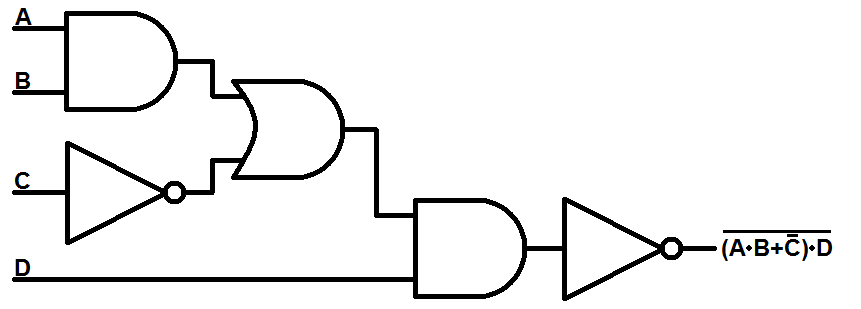
These 3 logic gates can be put together to form a logic circuit and using the truth table for each of the gate we can determinate the circuits truth table.
 
This is an example


This is it for now. If you have any questions or problems about this topic feel free to ask !! :D
 
Bye bye !! :)

Binary 3

Heyyy againn !!
So next we have c) The conversion between Binary to hexadecimal
(I know this is d on the previous post but this well help you for c )

I found this video. It is showing and explaining how you should do this type of conversion.


Next we have vice vesa. Where we are going to convert hexadecimal back into a binary digit.
 
Okay so I found this example, which I can explain with. Okay so what do we do first. 1) We split our hexadecimal number. For example in this case 5 and F. 2) Then we say what is 5 made of in binary sort of way. 3) Then we take F which is 15 and we do the same thing. 4) Last we put the numbers together and there you go You have your binary number :) Easy right ??
 
 
Last but not least we have the last 2 which don`t really need an explanion. These are decimal to hexadecimal and vice versa. We do these like this :
If a have a deciaml which I want it to be a hexadecimal number, I have to do these steps : I have to convert that number into a binary number and then convert it to a hexadeciaml that way. So we have to use what I explained before.
If a have a hexadecimal number this time to convert it to a decimal we have to do it like this : First you convert it to a binary number and then to a decimal number.
 
So now you even learned about conversions. Feel free to leave any questions for me to respond
 
Bye bye till next time !! :)
Chantelle

Tuesday, 16 April 2013

Binary 2

Long time no see....

I`m going to continue the topic we began last time before the activity.

Next we are going to talk about conversions between a) Binary to decimal
                                                                                          b) Decimal to binary
                                                                                          c) Hexadecimal to binary
                                                                                          d) Binary to hexadecimal
                                                                                          e) Decimal to hexadecimal
                                                                                          f) Hexadeciamal to decimal


A) Binary to decimal
                                                                                              
So as we see here the conversion between these 2 happen like that. The numbers were there is written decimal there are the
thing we did last time like 2 to the power of 7, 2 to the power of 6 etc..... Where there is 1 in the binary line, we add the the decimal up, where there is 0 we add the 0.

B) Decimal to Binary

This video will help you through it. It is extremely detailed and I have nothing to add to it.


This is it for now, not to make long posts so I won`t bore you. Very soon we`ll be discussing other conversions. Bye bye.....  


Monday, 4 February 2013

Activity

Heyyy !! Long time no see but I`ve been pretty busy !!!! :)


With the help of my teacher I found this activity that I think you guys will be interested in !!!! Check it out anf feel free to post any comments !!!!

http://www.bbc.co.uk/schools/gcsebitesize/ict/system/evaluation_act.shtml

On my computer the activity isn`t loading but hopefully on your does !!!! :( This activity is supposed to be about hardware and software. We talked about these subjects earlier.

Good luck !!! Bye bye :) 

Tuesday, 11 December 2012

Computer Logic !!! :D

Good morning everyone !!!! :D
Today I`m going to talk to you about..........
                                               Computer Logic


Let`s start of with something simple. Sooo the first thing of today it is the meaning of 2-state device or we can call it Bistable Device. The meaning is it is like a switch which can be only on and off.
 A clear example is a bulb. It can be only on or off so it is a Bistable Device. Illuminated or not Illuminated.


Computers are made up of also light switches but of course there are much more than 2. There is a wide range of devices. In computer we use transistors which has no mechanical or moving parts.
 
This can bring us to step nr 2 Binary. This is a number system which is a 2-state device.Only 1,0. A bit is a single digit from a binary number
 
 
 The number system we use everyday is called the decimal number system. Which are these 0,1,2,3,4,5,6,7,8,9
 
 
The more bits we have the more values we an represent. For example 3 bulbs can represent 000,001,010,011,100,101,110,111 and therefore 8 different values. So we can say it is 2 to the power of 3.
For 1 we say 2 to the power of 1 and so on..... An easy way is always 2 to the power of the bits we have, to find the values.
 
   That`s all for now not to make a very long post. If you want to know more wait for the next post which will be posted today or tomorrow or some days after. Feel free to post comments ;)
 
 Your friend,
         Chantelle xxx
 

Thursday, 6 December 2012

Keyboard !!!

Heyyyyy Mee againn,
        Today it`s going to be about
                                    Special Purpose Keyboard

Three examples of these can be ~ Pressure Sensitve Keyboard
 
This can be expained better by this video that me and my friend Antonella found for you :


This is usually used in point-of-sale.
 
 
The next one is ~ Touch Sensitive keyboard 
 
 
Here is some information basic information : 
  •  It’s a projected display, that can hook up to any Bluetooth enabled device, such as a PC, laptop, PDA etc.
  • The QWERTY keyboard display is projected onto a non-reflective surface, and detects the exact location where you touch the keyboard, relaying the keystroke back to your computer.
  • The keyboard is portable
  • It will work in a standard-lit room, but I’m sure that it looks best with the lights turned down low. 
 

 The last one is ~ Colour-coded keyboards
 
This is short video with some pictures  in it :


Some other examples may be Keyboards with larger keys or keyboards for one handed or one fingered typist !!
 
 
That`s all for today hope you`ll find it interesting. If you have any questions, don`t be shy just comment me and I`ll be happy to respond !!!!!!!!!
 
Good night ,
       Chantelle


Friday, 23 November 2012

Index - Word Processing

Heyyy againnnn , For the second time today !!! :) This time it is still going to be about word processing but about the last two advanced features of word processing. Which are Index and Tables of Contents. Let`s evaluate them one by one. First up isssss..............

Index........... What is the index ?? This is a list of words in a book that are mostly important in the book along with their page numbers and where these words may be found.
Watch this video to help you understand how to do it and what is the Index.


Well I have to go now !!! I`ll give you the instructions for the tables of contents very soon !!!

             Love always,
                        Chantelle

Word processing


Hey everyoneee, 
        
           Sorry I didn`t have time to post anything these last few days....... So today it is all going to be about................................................


Word Processing 


 What is the use of word processing ?????   

Word processing is used for the creation of text documents.
Word processor as many may know has various functions. Some that all know and some that maybe not everyone is familiar with them. These are some examples of functions :

  •  Text Editing
  • Word Wrap and Centering
  • Search and Replace 
  • Layout Settings
  • Headers, Footers and Page Numbering 
  • Style Sheets
  • Clipart
  • Print Preview 
  • Spelling Checker 


Have you every took any notice of  how the articles in magazines or newspapers look like ??


 Are you noticing  how the columns of words are ?? Well that is too another funtion of word processing. This function is also called columns in fact !!!!!!!!! :D


 Did you every have a party or a get-together and you did the invitations by computer and had to type every time the letter over and over again to personalize them ??? Well this is going to help you with that little problem and you won`t waste any more time. 

This is Mail-Merge

 Here is step by step how to do it :   


 Well That`s all for know. Later on today or the following week more features of word will be uploaded keep your eyes open for any posts !!! Enjoy the rest of your day :D  ......... 

If you have any questions please leave me a comment, I will be happy to respond you. 

     Your friend always,
                      Chantelle :)

Thursday, 18 October 2012

Defragmention

Heyyyyyyy !!!! :D 

         Sorry it`s been a while, but I had tons of homework to do but anyway today we`re going to talk about the computer utilities. So basically we have about 5 and these are
  • Formatting
  • Scanning
  • Defragmentation 
  • Viruses and antivirus 
  • Compressed Folders

For today we re going to start with defragmentation. This video clip will make you understand about what is defragmention, it`s uses and how it is done !!! I hope you enjoy it !!! 

http://www.youtube.com/watch?v=O8NqQn0bTKk&feature=related

Well sorry I couldn`t upload but it was giving me abit of trouble !!!! 
Don`t worry for the others, there will be other times that will be discussed........

Thanks alot for having time to read my blog !!!  Feel free to leave comments or questions 

Your friend always,
             Chantelle


Thursday, 4 October 2012

What is a computer ???

https://blogger.googleusercontent.com/img/b/R29vZ2xl/AVvXsEj2WYbI7L14gqJt2zOmh220w0dQ3knpFrhws6M2hZgPHka9jhFy2WGTCNvLhLTo8A0rotErY88HAjpy_pC-mrxSX_5IHfTOsQTP7Vf7g8b-0CPJMCOtxBB0aTo_28LQy6RPk2fDRCZiloLk/s400/information_processing_cycle.jpg

Hey everyone, me again 
        This is a simple block diagram of a computer system. We enter the data which is also known to the INPUT then we let the processor process . The processor is divided in 2 big categories which are the CPU and the MM (main memory) the MM is also divided in 2 which are the RAM and ROM. From this stage we can store the information for later use or continue it to get the data out of the computer which is also known as OUTPUT !!!  The output can be both a softcopy which means it is still on the computer or the hardcopy which means it is printout !! That I think covers that !!

Ohhhh and by the way always remember this We enter the data and then give it structure and then information comes out.

Hardware - seen and touched
Software - programs
               - divides in 2 - System software -perform general task and application software -software the computer uses

That's it for today !!! Good night everyone

Thursday, 27 September 2012

Welcome

Hello Guys I am Chantelle Saliba .This is my new Blog about my computer studies. Feel free to leave comments about my blog !!!